Projects

Selected work in AI and analytics.

AI and automation

How I approach AI systems, and a retrieval project of my own.

How I work

How I build AI systems

Evaluate before shipping

Give every agent a test set, and checks that run before its output reaches a person.

Design for failure

Let uncertain cases degrade gracefully and go to a person, instead of guessing.

Rules where possible, models where needed

Keep predictable steps in plain code, and use models for language, inside clear constraints.

Keep secrets and personal data contained

Keep keys out of logs, verify incoming webhooks, and send a model only the personal data a task needs.

Stay model-agnostic

Write prompts and interfaces that don't depend on one provider, so models can be swapped without a rewrite.

Make it observable

Log what matters, including failures, so problems show up in the data before they show up in complaints.
AI · Personal project · 2024

Telecare RAG Chatbot

Monitoring staff need fast, correct answers about alarm types, triage and escalation. This assistant answers from a process document and says when the documents don't cover a question, instead of guessing.

01 IngestScrape the portfolio page with BeautifulSoup and Selenium, download the PDF, extract text with PyMuPDF.
02 ChunkRecursive character splitting, with an LLM-driven agentic chunker built for comparison.
03 RetrieveEnsemble of BM25 keyword search and MiniLM sentence embeddings.
04 AnswerA grounded prompt to a local Llama 3 through Ollama, or an OpenAI model, behind a Gradio UI.

Stack

Python · LangChain · rank-bm25 · sentence-transformers · DocArray · Ollama · OpenAI · Gradio

Next steps

Semantic chunking, a persistent vector store, and evaluating each chunking method on a question set.

Analytics

Power BI dashboards and analysis, most of them live and interactive.

Analytics · Real data · Interactive

NZ Electricity Generation and Consumption

MBIE's yearly data turned into a monitoring dashboard for generation by plant type, consumption by sector, and network losses. Pick a year to see it compared with the year before.

Live Power BI report Open full screen

What it shows

  • KPI cards for electricity generated, consumed and lost each year. Each card's call-out compares the selected year with the previous year: actuals, variance, variance % and, for generation, efficiency (the share of generated electricity that was consumed).
  • Conditional colour: call-outs turn green when the year is up on the previous year, and red when it is down.
  • Losses are split into distribution and transmission, with the previous year's total and its variance.
  • Trend chart comparing actual and estimated consumption (lines) against generation (bars), from 2014 to 2022, since actual consumption isn't in the data before 2014.
  • Bookmarks and buttons switch between trends by generation plant type (biogas, hydro, geothermal, wind and more) and by consumption sector (residential, commercial, industrial and more).

Power BI · DAX · bookmarks · conditional formatting

How it's built

DAX: call-out value (PY | Var | Var% | Efficiency%)
PY Actuals | Var | Var% | Efficiency% (CY vs PY) =
VAR PY = [Electricity Generated PY]
VAR var_varie = [Electricity Varience]
VAR var_perc = [Electricity Variance %]
VAR var_effic = [Energy Efficiency]
VAR symbol_pos = "↑"
VAR symbol_neg = "↓"
VAR Result =
    SWITCH(TRUE(), var_varie >= 0, symbol_pos, symbol_neg)
    & " " &
    IF(
        ISBLANK(var_varie),
        FORMAT(var_varie, "+#,0;-#,0;0"),
        FORMAT(PY, "#,0") & " | " &
        FORMAT(var_varie, "+#,0;-#,0;0") & " | " &
        FORMAT(var_perc, "+0.0%;-0.0%;0%") & " | " &
        FORMAT(var_effic, "#,0%")
    )
RETURN
    Result
DAX: call-out colour (green up, red down)
001. Electricity Generated KPI color (fx) =
VAR var_nominal = [Electricity Varience]
VAR result =
    SWITCH(TRUE(),
        var_nominal >= 0, "#358686",
        "#B24A4A"
    )
RETURN
    result

Analytics · Interactive

Ski Resorts Planner

An app-style, two-page report to plan a ski trip across 499 resorts, with monthly snow cover for each one. Start with Check Snow % or Resorts.

Live Power BI report Open full screen

How it works

  • Matched each resort to the nearest snow-cover reading using INDEX, MATCH and ABS on latitude and longitude.
  • A MySQL view surfaces resorts that suit every skill level.

Power BI · Excel · MySQL

Analytics · Interactive

Employee Attrition Analysis

IBM's HR sample dataset, analysed to find what drives people to leave. Logic prototyped in SQL Server, then rebuilt as DAX measures.

Live Power BI report Open full screen

Key findings

  • Separated overall attrition (16.12%) from the period attrition rate (17.5%).
  • 221 of 237 leavers had 20 or fewer years' experience and earned under $10,000 a month.

Power BI · DAX · SQL Server · Python

Walkthrough

One minute, filtering by department.

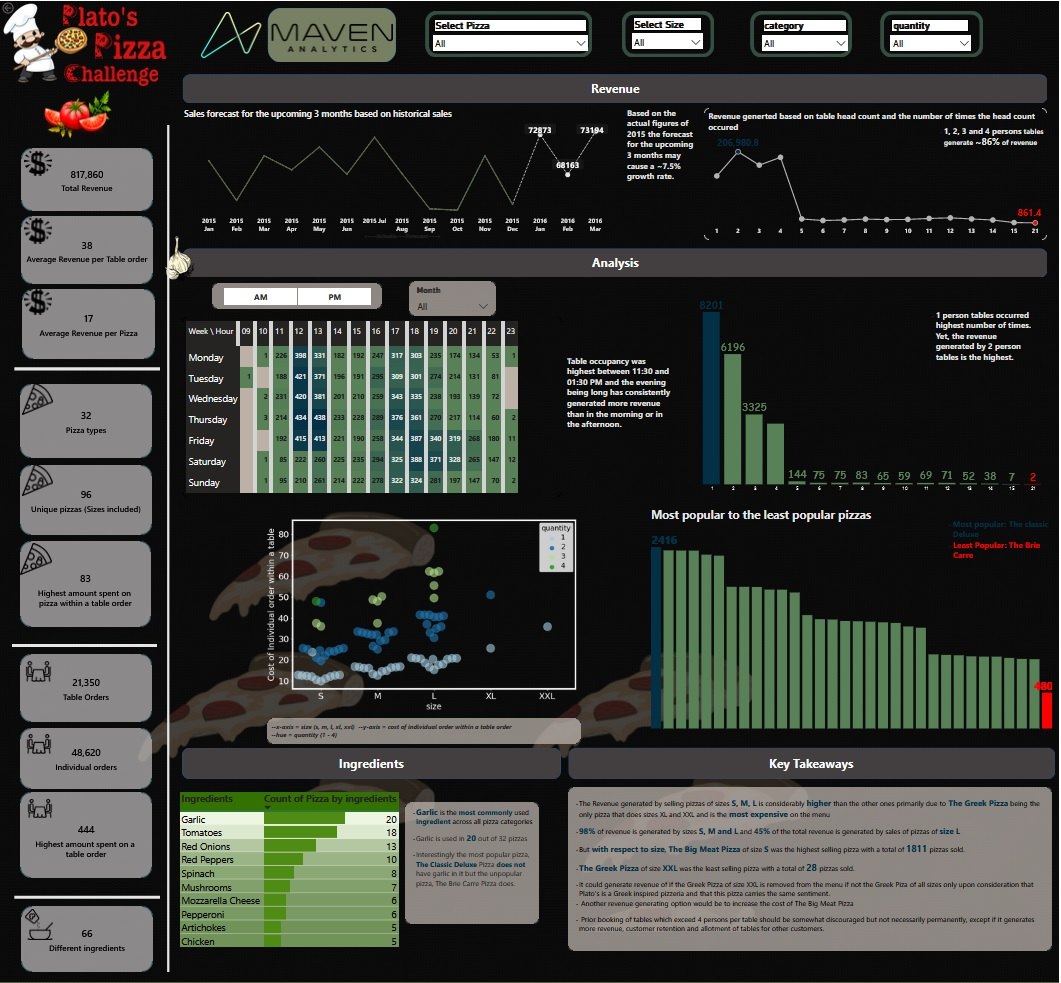
Plato's Pizzeria sales dashboard: revenue forecast, table occupancy heatmap, pizza popularity and key takeaways

Analytics · Challenge entry

Plato's Pizzeria Sales Analysis

A year of orders analysed for the owners: a sales forecast for the next quarter, busiest hours, and which table sizes and pizzas earn the most.

  • Tables of 1 to 4 people brought in about 86% of revenue ($702,852).
  • Two-person tables earned the most, though solo tables were most frequent.
  • Recommended dropping XL and XXL Greek pizza and stocking the four best sellers.

Power BI · DAX · Excel forecasting · Python (Seaborn)

Want the details behind a project?

Email me